Shipping Store Simulator 2037 Robot Employees Guide
Discover the ultimate shipping store simulator 2037 robot employees guide to master warehouse automation and grow your delivery business.
Published: Shipping Store Simulator 2037 Wiki Editorial Team
Table of Contents
Master Warehouse Automation in Shipping Store Simulator 2037
Stepping into the shoes of a bankrupt delivery service manager in a futuristic coastal city can feel overwhelming, but you do not have to handle every parcel alone. This comprehensive shipping store simulator 2037 robot employees guide explores how mechanical helpers transform your chaotic warehouse into an efficient, automated powerhouse. Whether you are sorting packages or dodging competitor tricks across Cranelock, understanding your robotic workforce is the key to long-term success.
Managing your logistics empire requires more than just manual labor and endless walking. According to community reports, players quickly discover that balancing counter service with city deliveries demands smart delegation. Below, we break down everything you need to know about integrating mechanical workers, maintaining equipment durability, and scaling your delivery operations smoothly.
Understanding the Robot Family and Their Roles
In Shipping Store Simulator 2037, automation is introduced precisely when manual tasks begin to slow down your progress. According to player experience shared on the Steam Store Page, the game strategically rolls out robotic assistants to match your expanding business needs without overwhelming your early-game resources.
The early lineup focuses on foundational warehouse tasks, while later expansions bring specialized units to tackle bulk orders and complex inventory challenges.
Customer Service Robot
Takes over the front counter when visitor queues grow too long. It accepts incoming orders, packs them into branded bags, and hands them directly to customers while you manage VIP requests.
Warehouse Loader
Keeps your front entrance clear of mounting package deliveries while you are out driving delivery vans or flying drones across the city.
Wholesaler Robot
Equipped with reinforced limbs and heavy hydraulic systems designed specifically to carry bulky, heavy-duty cargo loads efficiently.
Robot Duties and Operational Comparison
To make the best investment decisions for your logistics center, you need to understand how each automated assistant contributes to your daily workflow. The following table compares key automated units and their primary functions within the warehouse environment.
Robot Model
Primary Function
Ideal Deployment Phase
Key Advantage
Customer Service Unit
Front desk order processing
Early to Mid Game
Prevents customer queue bottlenecks
Warehouse Loader
Clearing entrance clutter
Mid Game
Maintains flow while you drive in the city
Wholesaler Assistant
Handling bulk cargo loads
Late Game
Speeds up heavy inventory processing
Maintenance Cleaner
Sweeping and basic upkeep
Mid to Late Game
Reduces manual sweeping time
Maintenance Systems, Durability, and Emergency Repairs
Even the most advanced mechanical assistants require attention. Every machine and robot in your facility features a hidden durability value capped at 100 points. As your robotic workforce operates, routine tasks gradually wear down their components, leading to slower performance if ignored.
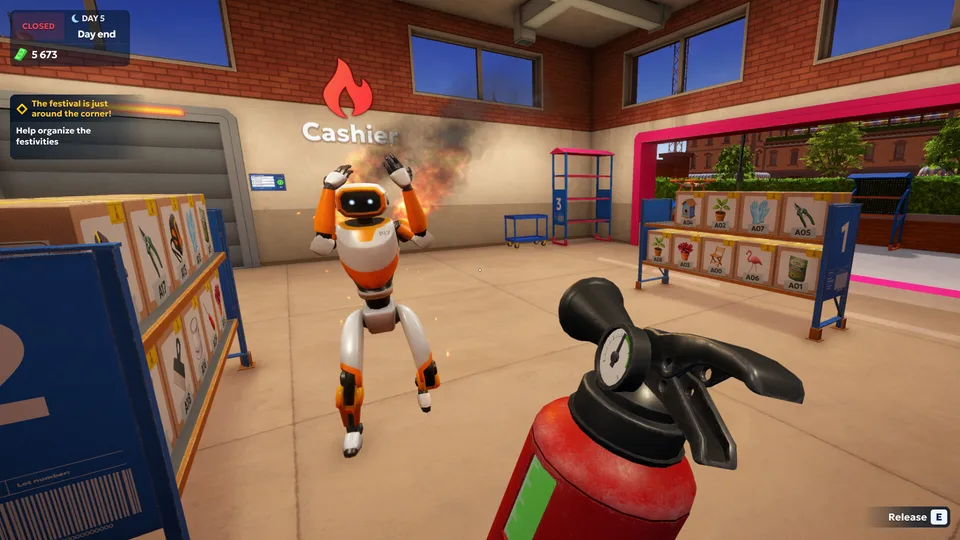
Community reports emphasize that neglecting machinery for too long can result in critical failures. When a robot's durability drops to zero, it may catch fire, panic, and run frantically around your warehouse floor.
Warning
Ignoring a burning, panicked robot requires immediate intervention. You must chase it down with a fire extinguisher before attempting repairs with a standard repair kit.
Repair Steps and Best Practices
Keep spare repair kits stored inside your delivery vehicle doors for easy access during city runs and field exploration.
Monitor your equipment performance for signs of sluggish movement or unexpected smoke in the warehouse.
Equip a fire extinguisher immediately if a neglected machine catches fire and begins panicking.
Apply a single repair kit to restore any damaged machine or robot back to full 100% durability instantly.
Balancing City Exploration and Automated Efficiency
While your robots manage the indoor workflow, your role often shifts toward outdoor logistics, including van driving, drone coordination, and secret VIP storylines. Player feedback highlights that mastering the shipping store simulator 2037 robot employees guide principles prevents you from getting bogged down by repetitive manual chores.
The city of Cranelock offers compact navigation, but efficient managers rely heavily on their automated staff to keep the warehouse running smoothly while they complete time-sensitive deliveries across town.
Tip
Always check parking lots and out-of-the-way locations like local motels during your city drives to discover broken robots that can be repaired for unique achievements.
Frequently Asked Questions
What is the main purpose of robot employees in Shipping Store Simulator 2037?
The shipping store simulator 2037 robot employees guide outlines that robots take over routine tasks like counter service, parcel packing, and heavy loading, allowing managers to focus on city logistics and VIP contracts.
How do I repair a broken or burning robot?
You must put out any active fires using a fire extinguisher, then apply a standard repair kit to restore the unit back to full operational durability.
Do robot assistants require ongoing maintenance?
Yes, every unit has a durability score that decreases with use, eventually causing slower performance or critical failures if left unattended for too long.
Where can I purchase or find additional robots?
You can acquire advanced automated units as your store progresses through the game's upgrade tiers, and you can even discover broken units scattered around the city map.