Shipping Store Simulator 2037 Demo Gameplay & Features
Discover shipping store simulator 2037 demo gameplay, warehouse tasks, and management features in this detailed release preview.
Published: Shipping Store Simulator 2037 Wiki Editorial Team
Table of Contents
Introduction to Logistics Management
Diving into the shipping store simulator 2037 demo gives players an immediate taste of fast-paced warehouse management and retail operations. Managing a burgeoning logistics hub efficiently matters because early operational choices directly determine whether your store can handle increasing customer volume and lucrative VIP requests. Developed by Playstrom, this title challenges you to transform a messy, trash-filled warehouse into a streamlined commercial shipping station.
Whether you are unboxing shipments, stamping inventory at the labeling station, or upgrading your storefront with automated robots, understanding the core gameplay loops is essential. In this guide, we explore the mechanics, equipment upgrades, and community insights surrounding the release.
Warehouse Setup and Cleaning Mechanics
Before welcoming your first paying customers, you must whip the physical workspace into shape. According to player experience reports, starting out involves mundane yet satisfying chores such as picking up trash bags, clearing debris, and scrubbing floors with a mop. Stamina management plays a subtle role here, as heavy lifting and running deplete your energy meter.
Once the floors are clean and utilities like electricity are restored, setting up your initial furniture layout is crucial for workflow efficiency.
Clear Debris: Pick up scattered trash bags and mop up dirty floor spots to prepare the warehouse interior.
Activate Dock & Licenses: Turn on loading dock power and unlock your first yard goods merchandise license via the PC terminal.
Unload and Label: Unload incoming delivery boxes from transport vans onto platform carts, then press them against the labeling machine lever.
Place Shelves: Arrange storage shelves near your cash register counter to allow quick customer service retrieval.
To help visualize the starting gear and equipment available during the early phases, the comparison table below outlines key items and their functions.
Equipment / Item
Primary Function
Cost / Acquisition
Platform Cart
Transport multiple boxes simultaneously
$250 (Store purchase)
Labeling Machine
Applies unique barcodes to inventory boxes
Initial warehouse setup
Storage Shelving
Displays products for customer QR code orders
$100 per unit
Customer Service Robot
Automates routine store tasks
$550 (Requires expansion)
Managing Customer Orders and Inventory
Once your loading dock goes live and inventory sits neatly on shelves, customers will begin streaming in between 9:00 AM and 9:00 PM. Shoppers walk up to your terminal, scan QR codes, and present specific purchase requests ranging from garden gnomes and bird feeders to fertilizers and shears.
Fulfilling these orders requires keeping your shelves fully stocked. If an item runs out, frustrated customers may abandon their queue and leave. Community reports indicate that maintaining diverse stock levels prevents bottlenecks. Furthermore, purchasing branded packaging provides both customer convenience and bonus advertising for your business.
Keep labeling rolls stocked to ensure incoming box shipments can be quickly processed.
Monitor your stamina meter before sprinting across town for long-distance deliveries.
Organize high-demand items like birdhouses and watering cans near the front register.
Repair worn-out warehouse equipment regularly using repair kits to prevent performance drops.
VIP Deliveries and Business Expansion
As your store gains traction, VIP clients will start submitting special orders that require hand-delivery outside the standard shop hours. These high-profile requests often yield substantial cash rewards and unlock advanced store licenses, though they also test your time-management skills.
Balancing local counter service with cross-town VIP deliveries can become overwhelming. Fortunately, hiring robotic assistance changes the management dynamic entirely.
Customer Service Robot
Automates routine indoor store operations, allowing you to focus on logistics management and special deliveries without letting store queues build up.
Loader Robot
Unloads incoming delivery boxes automatically, though warehouse expansion upgrades are typically required to accommodate advanced automated infrastructure.
Players must weigh the financial cost of warehouse expansion against immediate equipment needs. Below is an overview of financial milestones and key progression phases reported by the community.
Progression Phase
Key Objective
Financial / Unlock Requirement
Phase 1: Cleanup
Clear warehouse, setup first shelf & label machine
Starting capital
Phase 2: First License
Unlock yard goods & fulfill standard customer QR orders
~$500 earned revenue
Phase 3: VIP Contracts
Deliver special items to local repair shops and festival organizers
Completed standard orders
Phase 4: Automation
Purchase customer service robots and platform carts
$500+ and store upgrades
Strategic Tips and Sabotage Missions
As you progress further into the game, external pressures emerge. Rival logistics companies like Quick Box will test your patience, and quirky community events—such as crane lock festivals—will surge demand for specialized tools and festival supplies.
Tip
Optimize Cart Usage: Investing in a small platform cart early on lets you haul multiple boxes at once, dramatically cutting down travel time for VIP deliveries and festival orders across the street.
Warning
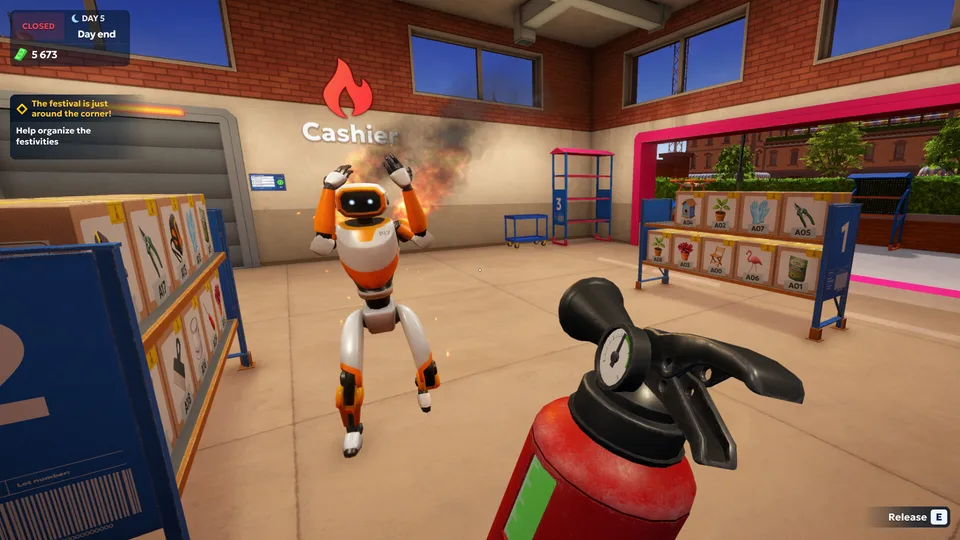
Avoid Robot Overload: Speeding up your automated robots by repeatedly interacting with them can cause them to overheat and catch fire. Always keep a fire extinguisher handy in your inventory.
Frequently Asked Questions
Is the shipping store simulator 2037 demo representative of the full game?
Demos showcase a curated slice of gameplay mechanics, trial items, and introductory tasks. Content plans, final release dates, and user reviews for the full game app should be evaluated independently from the demo version.
How do I handle deliveries while customers are waiting in the store?
You can automate indoor tasks by purchasing customer service robots once you have saved enough capital and expanded your warehouse facilities.
Can I change item prices or store names in the demo?
Current demo features primarily focus on foundational logistics, box labeling, shelf stocking, and completing specific VIP client contracts.
Where can I check official updates for Shipping Store Simulator 2037?
You can track official announcements, community discussions, and system requirements directly through the verified Steam Game Hub.