Shipping Store Simulator 2037 Demo First Look Guide
Discover our shipping store simulator 2037 demo first look, exploring futuristic warehouse management, automated robots, and logistics gameplay.
Published: Shipping Store Simulator 2037 Wiki Editorial Team
Table of Contents
Getting Started with the Future of Logistics
Stepping into the shoes of a bankrupt delivery manager in a futuristic metropolis can feel overwhelming, especially when you are greeted by an abandoned warehouse full of trash and unlabeled boxes. If you want to understand what makes management games so addictive, our shipping store simulator 2037 demo first look breaks down everything you need to know about starting your enterprise. Managing a futuristic logistics hub requires balancing immediate physical chores with long-term automation strategies, making this shipping store simulator 2037 demo first look essential reading for aspiring warehouse tycoons.
The initial hours of the experience focus heavily on foundational tasks rather than passive management. According to player experience reports, your first shift revolves around clearing debris, mopping floors, and mastering the manual labeling machine. Balancing your stamina meter while hauling inventory sets a frantic pace that immediately engages simulation fans.
Shift Phase
Primary Tasks
Equipment Needed
Morning Prep
Clean warehouse, mop floors, setup terminals
Mop, Trash Bags
Inventory Setup
Unload delivery van, label boxes
Labeling Machine, Cart
Store Hours
Scan customer QR codes, fulfill orders
Shelves, Branded Packaging
Mastering Early Warehouse Operations
Once the dust settles and the electricity is turned on, the real work of running a package hub begins. Initial customer service relies on scanning unique QR codes and matching items like garden gnomes, bird feeders, and fertilizer to customer requests. Player experience highlights the importance of positioning your shelves close to the register to minimize walking distance and conserve your stamina meter.
Purchasing your first licenses unlocks new product categories such as yard goods and repair kits. Community reports suggest investing in a platform cart early in your playthrough, as carrying boxes one by one severely limits your daily efficiency.
Activate Loading Docks: Turn on the power switch in the loading bay to begin receiving daily supply deliveries.
Process Inventory: Unload boxes from the delivery van onto your platform cart and transport them to the labeling station.
Apply Labels: Hold down the lever on the labeling machine until each box is properly tagged for retail sorting.
Stock Shelves: Arrange labeled goods on your display racks so customers can easily scan and purchase items during business hours.
Transitioning from Manual Labor to Robot Automation
As your daily revenue increases, running back and forth between customer checkouts and delivery drop-offs becomes unsustainable. Fortunately, the game introduces automated assistance to ease your workload. Based on community report insights, saving up for your first customer service robot transforms the gameplay loop from a stressful sprint into a manageable management sim.
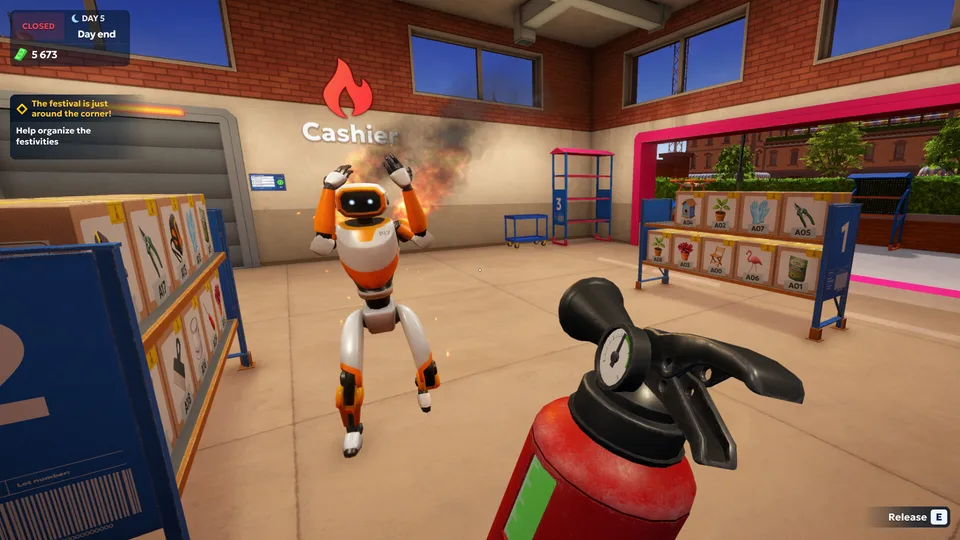
Expanding your warehouse capacity unlocks more advanced logistics options, though you must carefully monitor equipment wear and tear. Using repair kits prevents performance degradation across your machinery, ensuring your automated assistants operate at peak efficiency without catching fire from overloads.
Customer Service Robot
Takes over routine counter tasks and helps serve waiting customers, drastically reducing queue abandonment rates.
Platform Cart
Allows you to transport multiple heavy boxes simultaneously across your warehouse floor, saving crucial stamina.
Warehouse Expansion
Increases your floor space to accommodate additional shelving units, heavy machinery, and future robotic staff.
Navigating VIP Orders and Competitor Sabotage
Beyond standard retail customers, the urban environment introduces high-paying VIP clients who demand special deliveries across the city. These unique requests often require you to step outside standard store hours, venturing into nighttime operations where rival logistics companies like Quick Box pose a direct threat.
Player experience notes that handling VIP contracts builds vital neighborhood relationships, leading to underground tips and lucrative black-market opportunities. However, you must remain vigilant against competitor sabotage and equipment maintenance failures.
Tip
Always keep a fire extinguisher and spare repair kits on hand. Overworking your automated robots can cause them to overheat and catch fire during heavy shift cycles.
Client Type
Order Requirement
Reward & Benefit
Standard Retailer
QR code product matching
Steady daily cash flow
Local Repair Shop
Urgent tool delivery
Unlocks specialized repair licenses
Festival Organizers
Bulk event staging items
High payouts and city reputation
Underground Contacts
Black market hardware
Strategic advantages against rivals
For official updates, system requirements, and purchase options, you can check the Shipping Store Simulator 2037 on Steam page to view the full scope of Playstrom's logistics adventure.
What is included in the shipping store simulator 2037 demo first look?
The shipping store simulator 2037 demo first look covers early-game mechanics, including warehouse cleaning, manual box labeling, shelf management, and your first robotic automation upgrades.
Can I automate my warehouse in Shipping Store Simulator 2037?
Yes, once you accumulate enough capital and expand your warehouse, you can purchase and deploy robots to handle customer service and inventory tasks.
How do VIP orders work in the game?
VIP clients place special high-value orders that require direct delivery across the city, often unlocking exclusive licenses and narrative progression milestones.