Shipping Store Simulator 2037 First Employee Guide
Discover how to hire your first employee in Shipping Store Simulator 2037. Master warehouse automation, manage VIP clients, and scale your logistics empire.
Published: Shipping Store Simulator 2037 Wiki Editorial Team
Table of Contents
Introduction to Managing Your Future Shipping Empire
Running a bankrupt delivery service in the year 2037 sounds like a daunting task, especially when you are doing everything by hand. If you are searching for instructions on shipping store simulator 2037 first employee, you are likely feeling the early-game crush of scanning parcels, cleaning floors, and managing angry queues. Understanding how and when to automate is essential because it transforms a stressful manual grind into a smooth, rewarding logistics simulation.
At the start of your journey in Cranelock, you are entirely on your own. According to player experience reports, the initial phase requires you to clean your warehouse, turn on the power, arrange shelves, and manually scan every incoming package. However, relief is on the horizon as you progress through the game's economy and unlock robotic assistants to lighten your daily workload.
Understanding the Early Game Grind and Progression
Before you can think about hiring staff, you need to survive the initial days of manual labor. The gameplay loop starts in a messy warehouse where you must unpack shipments, use the manual labeling machine, and hand out packages to waiting customers.
To help you navigate the early financial and operational milestones, here is a breakdown of the initial progression steps:
Cleanup and Setup: Grab a trash bag, mop the floors, and set up your very first storage shelf to receive basic e-commerce merchandise licenses.
Mastering the Counter: Greet customers during operating hours (9 AM to 9 PM), scan their order numbers, and place items into branded company bags.
Handling VIP Orders: Fulfill special requests from major clients delivered via the loading ramp to secure large cash payouts.
Saving for Upgrades: Accumulate funds past the $1,000 threshold to invest in advanced warehouse licenses, repair tools, and eventual automation apps.
Managing your cash flow effectively ensures you do not run out of essential supplies like label rolls and trash bags. Below is a quick overview of key operational expenses and initial requirements during your first few days:
Operation / Item
Cost / Requirement
Purpose in Gameplay
Repair Licenses
About $1,000
Unlocks new product categories and higher-tier customer orders.
Label Rolls & Bags
$35 per restock
Essential consumables required to process and pack customer orders.
Repair Kit
$45 (5 charges)
Fixes worn-out warehouse equipment and malfunctioning robots before they break down.
Transport Cart
$250 + Storage Lv. 2
Allows you to carry multiple packages at once, drastically speeding up deliveries.
Unlocking and Hiring Your First Employee
The turning point in your logistics career arrives when manual tasks begin competing with new responsibilities, such as long-distance deliveries and VIP requests. Community reports confirm that the game intentionally overwhelms you right before introducing automation options.
When your queue starts piling up, you will unlock the management app on your computer interface. Your very first automated helper—often referred to as the Customer Service Robot or loader—becomes available once you meet the storage level requirements.
Customer Service Assistant
This robot takes over the front counter, accepting orders, packing items into company bags, and handing them to customers so you can focus on logistics and expansion. You can learn more about official updates and community discussions on the Steam Store Page.
Warehouse Loader
Designed to handle heavy lifting, the loader keeps your entrance clear by managing arriving transport trucks and unloading boxes while you are out running errands around the city.
Essential Tips for Efficient Warehouse Automation
Once you secure your shipping store simulator 2037 first employee, your management style will shift dramatically. However, automation comes with its own maintenance responsibilities. Neglecting your robotic staff can lead to critical mechanical failures.
Tip
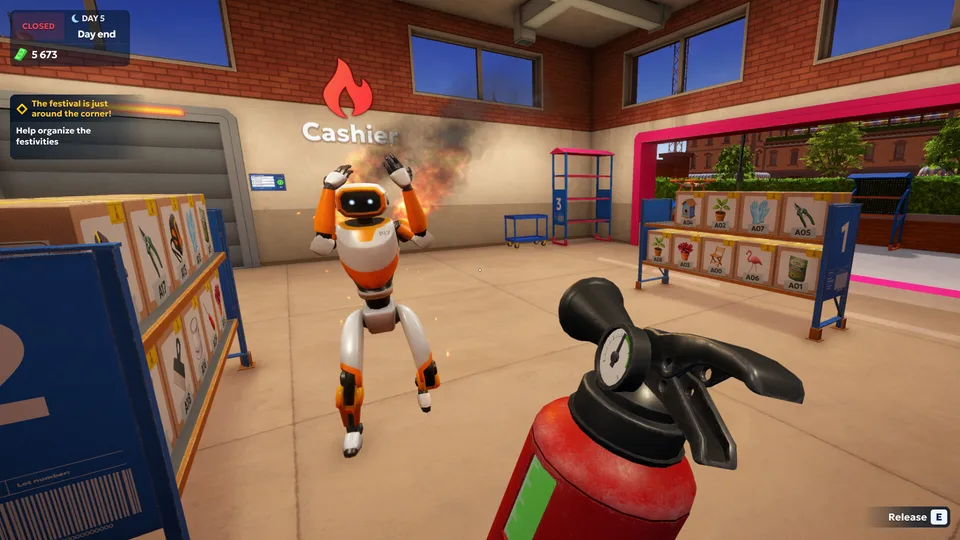
Always keep a spare repair kit stored inside your delivery vehicle. Wild or overworked robots can wear down, slow to a crawl, or even catch fire, requiring immediate intervention with a fire extinguisher and a repair kit.
To maintain a highly efficient workspace, consider the following best practices gathered from player experience:
Invest in a transport cart early to reduce transit times for bulky items and VIP deliveries.
Balance your spending between new licenses, shelf upgrades, and daily consumables like label rolls.
Monitor equipment durability closely to prevent unexpected robot malfunctions during peak business hours.
Utilize the compact layout of Cranelock to quickly complete city runs and return to your base before customer queues overflow.
Frequently Asked Questions
How do I get my shipping store simulator 2037 first employee?
You must progress through the early days by fulfilling standard orders, earning cash, upgrading your storage level, and unlocking the management app on your computer to activate robotic assistants.
Can I automate package labeling right away?
No. Early-game robots primarily handle customer service or basic unloading tasks. Advanced automation for labeling and sorting requires higher warehouse levels and deeper tech tree investments.
What happens if my robots break down?
If equipment or robotic assistants are ignored for too long, their durability drops to critical levels where they may catch fire. You will need to extinguish them and use a repair kit to restore them to full functionality.
Is driving required to succeed in the game?
Yes, handling VIP orders and delivering goods across the compact coastal city of Cranelock requires driving vans or using drones for urgent shipments as your business expands.