Shipping Store Simulator 2037 Starting From Bankruptcy
Master shipping store simulator 2037 starting from bankruptcy with expert management tips, automation guides, and early-game survival strategies.
Published: Shipping Store Simulator 2037 Wiki Editorial Team
Table of Contents
Navigating the Challenges of Shipping Store Simulator 2037 Starting From Bankruptcy
Stepping into the managerial shoes of a failing logistics hub can feel overwhelming, especially when shipping store simulator 2037 starting from bankruptcy tests your patience and multitasking skills. When you first open the doors of Rocket Post in the near-future coastal city of Cranelock, you are greeted not by success, but by piles of trash, unlabelled boxes, and a locked storefront. According to player experience reports, mastering shipping store simulator 2037 starting from bankruptcy requires an immediate shift from casual simulation gameplay to strict time management and resource prioritization. This comprehensive guide details how to turn your financial situation around, clean up the warehouse, and build an efficient delivery empire without losing your mind.
For official updates, community discussions, and purchase details, you can visit the official Steam Store Page for Shipping Store Simulator 2037. Understanding the early economic mechanics is essential because the game's initial hours demand high manual effort before automation can take over. Below is a breakdown of what you will face during your first few business days.
Game Phase
Primary Objective
Key Challenge
Main Reward
Day 1
Clean warehouse, open store, serve walk-ins
Trash cleanup, manual labeling
Basic cash flow, initial customer trust
Day 2
Unlock VIP orders, buy repair licenses
High stamina drain, driving errors
Large payouts, story progression
Day 3+
Upgrade warehouse, deploy automation
Label shortages, equipment wear
Autonomous robots, steady profits
Cleaning House and Managing Your First Workday
Your very first morning sets the tone for your entire playthrough. Before you flip the sign to welcome customers, you must tackle the physical state of the warehouse. Based on player reports, letting trash accumulate or failing to clear the entrance will severely bottleneck your workflow. Grab your mop bucket, clear away the debris, and bag the trash to earn small early cash bonuses.
Once the interior is clean, focus on the unloading dock. Unloading boxes from the delivery van, moving them to the labeling machine, and organizing your inventory shelves will consume most of your morning.
Clear the Debris: Collect all trash bags from the floor and dispose of them properly to maintain a clean workspace.
Process Deliveries: Unload boxes from incoming vans and run them through the manual labeling machine before placing items on shelves.
Manage Operating Hours: Open your store between 9:00 AM and 9:00 PM to capture walk-in traffic while handling offline deliveries after hours.
Tip
Keep your stamina high by utilizing coffee machines when available. Running around the warehouse manually drains energy fast, so managing your stamina prevents costly delays during peak customer hours.
Scaling Up: VIP Orders and Early Upgrades
As you progress past the initial setup, shipping store simulator 2037 starting from bankruptcy introduces high-stakes VIP clients. These important orders require manual delivery across Cranelock using your van. While driving on a keyboard can sometimes lead to frustrating crashes, successfully completing VIP deliveries yields substantial financial payouts that dwarf regular walk-in sales.
Community reports indicate that players often experience a severe cash crunch right before purchasing their first major licenses, such as repair kits or wholesale upgrades. Balancing your daily inventory costs against these big-ticket license purchases is the key to breaking the cycle of debt.
Walk-In Customers
Regular clients order online, scan their QR codes at your counter, and require you to match items like birdhouses, plants, and gardening gloves quickly to maintain steady income.
VIP Deliveries
Special clients place bulk or unusual orders, such as large barbecues or garden hoses, which must be hand-delivered across the city for premium cash rewards.
Automating Your Warehouse Operations
One of the most rewarding aspects of shipping store simulator 2037 starting from bankruptcy is transitioning from manual labor to full robotic automation. In the early game, you will find yourself running back and forth between the cash register, the labeling machine, and the delivery dock. However, investing in automation completely alters how you manage the business.
According to developer insights and community feedback, automation elements are strategically introduced right when manual tasks begin to overwhelm the player. The Customer Service Robot takes over counter duties and scanning QR codes, while the Loader clears incoming van deliveries while you are out on VIP runs.
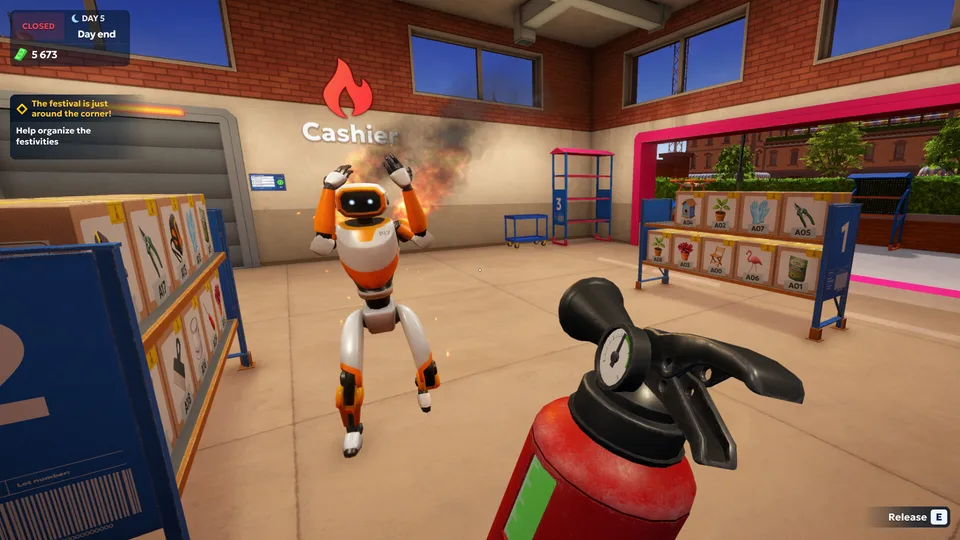
[ ] Monitor equipment durability values to prevent machinery and robots from catching fire.
[ ] Keep a supply of repair kits in your delivery van doors for emergency repairs in the field.
[ ] Upgrade your warehouse shelving and labeling machines as soon as capital permits.
[ ] Balance walk-in customer service with long-distance VIP package drop-offs.
Automation Tool
Primary Function
Optimal Unlock Timing
Customer Service Robot
Accepts orders, packs bags, serves clients
When customer queues outgrow manual speed
Loader Robot
Clears entrance docks and unloads vans
When you start spending more time driving outside
Automated Label Machine
Speeds up box processing
After expanding your warehouse level
Frequently Asked Questions
How do I recover from bankruptcy in Shipping Store Simulator 2037?
To recover from bankruptcy, focus on completing your daily walk-in customer orders efficiently while aggressively saving for high-payout VIP deliveries across Cranelock.
Can I automate my store completely?
Yes, as you purchase advanced licenses and upgrade your warehouse, you can deploy customer service robots, loaders, and other automated assistants to handle routine tasks.
What causes warehouse equipment to break down?
Every machine and robot has a hidden durability value that decreases with use. If ignored, they will slow down or catch fire, requiring you to use a repair kit.
How long does a typical playthrough last?
A standard playthrough ranges from 8 to 15+ hours, depending on whether you focus strictly on main objectives or explore the city's storyline and secrets.