Shipping Store Simulator 2037 Beginner Guide & Tips
Master warehouse management and automation with our shipping store simulator 2037 beginner guide. Discover essential tips for success today.
Published: Shipping Store Simulator 2037 Wiki Editorial Team
Table of Contents
Getting Started with Your Future Logistics Business
Stepping into the shoes of a bankrupt delivery service manager in a neon-lit future can feel overwhelming at first. If you are looking for a reliable shipping store simulator 2037 beginner guide, you have come to the right place. Managing customer queues while unloading incoming shipments requires quick thinking and efficient resource management.
Understanding how to balance your time between front-counter service and warehouse organization determines whether your business thrives or fails. According to player experience reports, the opening hours often test your multitasking skills as visitors crowd your reception desk. Fortunately, this chaotic phase is intentionally designed to push you toward investing in your first automated helpers.
Phase
Main Focus
Recommended Action
Early Game
Counter service & manual packing
Focus on serving walk-ins and saving capital for automation.
Mid Game
Robot deployment & equipment upgrades
Purchase Customer Service Robots and Loaders to handle routine tasks.
Late Game
City logistics & VIP contracts
Utilize delivery vans and drones to manage specialized high-paying orders.
Mastering Warehouse Automation and Robot Maintenance
As your delivery hub expands, manual labor quickly becomes a bottleneck that slows down your daily operations. Implementing the right automation tools allows you to scale your business without getting bogged down by repetitive tasks. A proper shipping store simulator 2037 beginner guide must emphasize how and when to deploy your robotic workforce effectively.
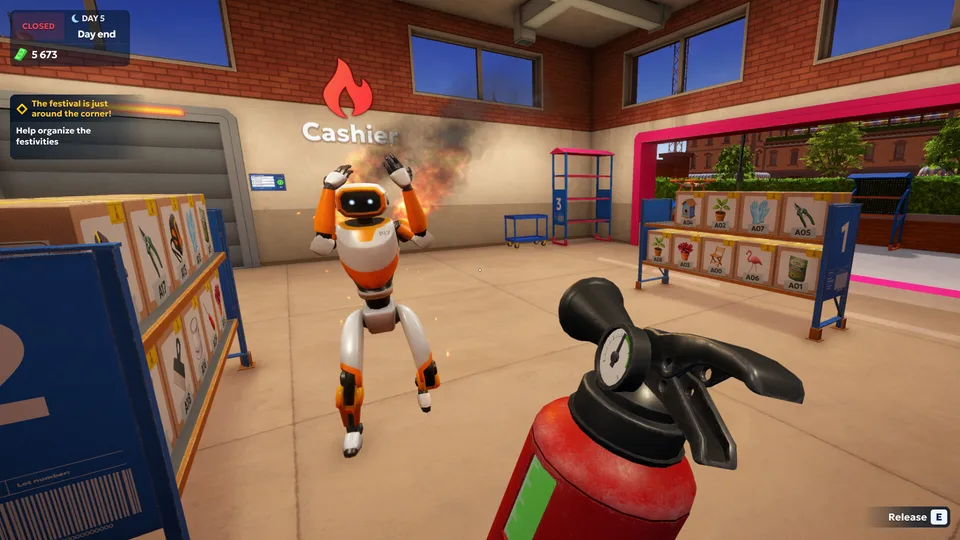
Robots and warehouse equipment feature a hidden durability system capped at 100 points, which decreases with every use. Ignoring your mechanical staff leads to severe performance drops, and critically damaged units may even catch fire and panic around the facility. Community feedback highlights the importance of keeping repair kits handy both in your warehouse storage and inside your delivery vehicle.
Monitor Equipment Wear: Check your labeling machines and robots regularly to catch performance degradation early.
Keep Repair Kits Ready: Store emergency repair items in your vehicle doors so you can fix broken units found out in the city.
Extinguish Incidents Quickly: Use a fire extinguisher immediately if an unattended robot catches fire and begins running amok.
Navigating Cranelock and Handling VIP Deliveries
Beyond the walls of your warehouse lies the compact coastal city of Cranelock, inspired by architectural styles ranging from Edwardian roots to modern near-future density. Driving your delivery van through the city streets opens up new progression paths, including lucrative VIP clients and black market opportunities. However, navigating the city requires careful driving to avoid frequent crashes on keyboard controls.
Player reports suggest that while driving can occasionally feel like a chore due to handling physics, the narrative threads woven through VIP deliveries add a layer of entertaining storytelling. Balancing your time between local parcel sorting and long-distance city drops ensures a steady stream of revenue. Below is a breakdown of the primary delivery types you will encounter during your playthrough.
Delivery Type
Description
Primary Benefit
Walk-in Pickups
Standard customers collecting parcels at your counter.
Steady base income during opening hours.
Standard City Drops
Delivering packages using vans or drones across Cranelock.
Higher payouts and business expansion opportunities.
VIP Contracts
Secretive or specialized nighttime orders for unique characters.
Unlocks entertaining story threads and unique rewards.
Essential Tips for Efficient Store Management
Optimizing your daily routine requires eliminating unnecessary friction points in your warehouse layout. Because the game removes placement grids, you enjoy total freedom in organizing your workstations and equipment. However, poor layout planning can lead to congested walkways and slower fulfillment times.
To help you get the most out of your management run, consider the following strategic recommendations gathered from community insights.
[ ] Keep your main warehouse entrance clear of stacked boxes to ensure smooth robot navigation.
[ ] Invest in automation upgrades incrementally rather than skipping multiple tiers at once to maintain steady pacing.
[ ] Utilize delivery drones for urgent shipments to save travel time across Cranelock.
[ ] Keep spare repair kits in your vehicle inventory to handle unexpected outdoor maintenance.
Frequently Asked Questions
What is the main goal in Shipping Store Simulator 2037?
The primary goal in this shipping store simulator 2037 beginner guide is to transform a failing delivery hub into a highly automated, profitable logistics empire by managing parcels, upgrading equipment, and fulfilling city contracts.
How do I prevent my robots from catching fire?
Robots lose durability with every task they perform. Regularly inspect your machines and apply repair kits before their condition drops to critical levels to prevent malfunctions and fires.
How long does it take to complete the game?
Most players report spending between 8 to 15+ hours to experience the core gameplay loop, complete the storyline quests, and explore the available automation upgrades.
Can I play the game using a keyboard and mouse?
Yes, mouse and keyboard controls are fully supported and preferred by many players for managing warehouse UI elements, though driving vehicles through the city requires careful navigation.