Shipping Store Simulator 2037 First Five Hours Walkthrough
Master your opening shift with our shipping store simulator 2037 first five hours walkthrough. Get expert setup tips and logistics strategies.
Published: Shipping Store Simulator 2037 Wiki Editorial Team
Table of Contents
Master Your Grand Opening in Cranelock
Stepping into the futuristic coastal city of Cranelock can feel overwhelming when boxes start piling up at your door. If you want to conquer the shipping store simulator 2037 first five hours walkthrough, you need a solid plan to balance manual labor, store cleanliness, and early financial investments. Developed by Playstrom, this near-future logistics management game challenges you to turn a bankrupt post office into a thriving automated enterprise.
Understanding how to manage your time during the critical opening hours sets the foundation for your entire playthrough. From sweeping up trash and stocking shelves to greeting your first wave of eccentric local customers, every minute counts before delivery schedules ramp up.
Power and Cleanup: Enter your newly acquired Rocket Post building, flip the main power switch, and immediately collect all loose trash bags to toss them into the bin.
Scrub the Floors: Grab the mop from the front entrance area and clean the warehouse floors to ensure a passing grade from your supervisor, Shirley.
Organize Inventory: Set up your primary shelving units right behind the counter so you can grab packages instantly without wasting precious seconds.
Activate Loading Docks: Purchase your initial license at the loading docks to officially open for business between 9:00 AM and 9:00 PM.
Day One Workflow and Efficiency Basics
Your first official workday begins at 9:00 AM sharp, bringing a steady stream of neighborhood customers through your doors. To keep your rating high and your queue moving, you must master the core loop of scanning item codes and handing out branded shopping bags for extra advertising value.
According to player experience reports from the Steam community, failing to organize your incoming boxes efficiently during the first few hours will lead to massive bottlenecks. You should unload the delivery van immediately, place packages on the labeling machine to pull the lever, and arrange them in numerical order on your shelves.
Morning Prep Routine
Consume a cup of coffee to maintain your stamina, check your delivery schedule, and ensure your counter shelves are fully stocked with standard boxes and bags before the store doors open.
Customer Service Flow
Greet incoming residents, scan their QR codes or match their required package numbers (such as 0-1-2 sequences), hand over the branded bag, and send them on their way with a quick profit earned.
Surviving Day Two and Investing in Automation
By day two, the game introduces higher stakes, including your very first VIP client orders and broader delivery requirements across Cranelock. You will quickly notice that manual lifting cannot keep up with the volume, making robot automation your highest priority.
Based on community feedback, many players make the mistake of buying unnecessary cosmetic items or early fire extinguishers before securing essential warehouse licenses. Your primary financial goal during the first five hours is saving up to unlock automated repair and restocking licenses.
Day
Primary Objectives
Recommended Purchases
Key Challenges
Day 1
Clean warehouse, open store, sell stock
Basic shelves, branded bags
Managing queue times and manual sorting
Day 2
Deliver first VIP order, handle bulk boxes
Coffee supply, spare repair kits
Balancing counter service with van runs
Day 3+
Unlock advanced licenses, hire robots
Customer service bot, loader bot
Preventing equipment wear and tear fires
Tip
Always keep a repair kit handy in your delivery vehicle. According to community reports, wandering out into Cranelock can lead to discovering broken robots or equipment malfunctions that require immediate field repairs.
Avoiding Common Early Game Mistakes
Running a futuristic post office looks glamorous on paper, but poor resource management can stall your progress. A common pitfall during the shipping store simulator 2037 first five hours walkthrough is ignoring equipment durability values.
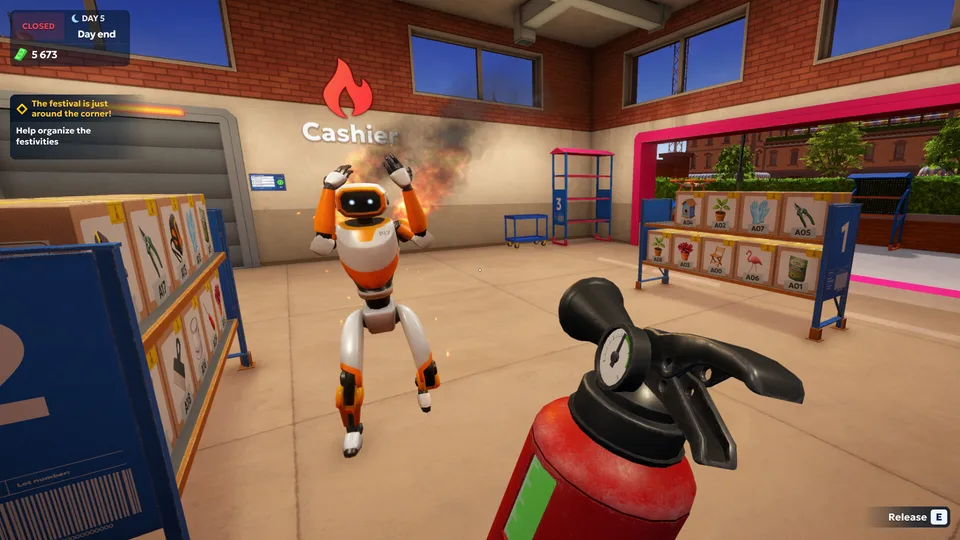
Every time you use manual labeling machines or automated robots, their hidden durability drops. If ignored, machinery will slow down and eventually catch fire, requiring you to chase down the frantic machine with a fire extinguisher before applying a repair kit.
Warning
Do not let your robots run dry on maintenance. A neglected machine will panic, catch fire, and sprint around your warehouse, disrupting your entire daily workflow.
[ ] Keep your warehouse floor spotless to maintain high customer satisfaction.
[ ] Stock up on branded bags to secure extra advertising bonuses.
[ ] Prioritize saving funds for automated helper bots rather than wasteful cosmetic upgrades.
[ ] Check delivery schedules frequently to prepare for incoming VIP cargo.
How long does it take to get your first robot helper?
Players typically unlock their first automation robot toward the end of day one or early day two, right around the time customer queues become too overwhelming to handle alone.
What is the main goal during the first five hours?
The primary focus of the shipping store simulator 2037 first five hours walkthrough is mastering package labeling efficiency, earning startup capital, and preparing your warehouse for advanced automation.
Are VIP orders mandatory to complete?
While VIP orders require driving out into Cranelock and take more effort, they offer massive payouts and drive the game's entertaining narrative storylines forward.
How do I stop machinery from catching fire?
Regularly monitor your equipment durability and use repair kits on any machines or robots before their performance degrades into critical condition.